


مشخصات مقاله
-
602
-
0.0
-
2767
-
0
-
0
آموزش MVC CRUD Example-Java Spring
برنامه های کاربردی MVC
مثال MVC CRUD
مثال MVC CURD در اسپرینگ
برنامه کاربردی CRUD (ایجاد، خواندن، به روز رسانی و حذف کردن) مهمترین برنامه برای ایجاد هر پروژه ای است.CRUD ایده ای برای توسعه یک پروژه بزرگ ارائه می دهد. در MVC اسپرینگ، می توانیم یک برنامه CRUD ساده بسازیم.
در اینجا از JdbcTemplate برای تعاملات پایگاه داده استفاده می کنیم. یک جدول ایجاد کنید. در اینجا از جدول emp99 موجود در پایگاه داده MySQL استفاده می کنیم. این جدول دارای 4 فیلد است: شناسه، نام، حقوق و سمت (designation). در اینجا شناسه که توسط یک دنباله تولید شده است، به طور خودکار افزایش می یابد.
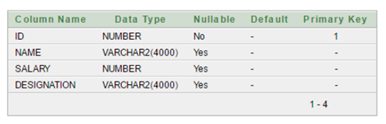
مثال MVC CRUD در اسپرینگ
1- وابستگی ها را به فایلpom.xml اضافه کنید.
pom.xml
 < !-- https://mvnrepository.com/artifact/org.springframework/spring-webmvc -->
< dependency>
     < groupId>org.springframework< /groupId>
     < artifactId>spring-webmvc< /artifactId>
     < version>5.1.1.RELEASE< /version>
< /dependency>

< !-- https://mvnrepository.com/artifact/org.apache.tomcat/tomcat-jasper -->
< dependency>
     < groupId>org.apache.tomcat< /groupId>
     < artifactId>tomcat-jasper< /artifactId>
     < version>9.0.12< /version>
< /dependency>
     < !-- https://mvnrepository.com/artifact/javax.servlet/javax.servlet-api -->
< dependency>
     < groupId>javax.servlet< /groupId>
     < artifactId>servlet-api< /artifactId>
     < version>3.0-alpha-1< /version>
< /dependency>
< !-- https://mvnrepository.com/artifact/javax.servlet/jstl -->
< dependency>
     < groupId>javax.servlet< /groupId>
     < artifactId>jstl< /artifactId>
     < version>1.2< /version>
< /dependency>
     < !-- https://mvnrepository.com/artifact/mysql/mysql-connector-java -->
< dependency>
     < groupId>mysql< /groupId>
     < artifactId>mysql-connector-java< /artifactId>
     < version>8.0.11< /version>
< /dependency>
     < !-- https://mvnrepository.com/artifact/org.springframework/spring-jdbc -->
< dependency>
     < groupId>org.springframework< /groupId>
     < artifactId>spring-jdbc< /artifactId>
     < version>5.1.1.RELEASE< /version>
< /dependency>
2- کلاس bean را ایجاد کنید.
در اینجا کلاس bean شامل متغیرهای (علاوه بر متدهای getter و setter) متناظر با فیلدهای موجود در پایگاه داده است.
Emp.java
package com.javatpoint.beans;

public class Emp {
private int id;
private String name;
private float salary;
private String designation;

public int getId() {
    return id;
}
public void setId(int id) {
    this.id = id;
}
public String getName() {
    return name;
}
public void setName(String name) {
    this.name = name;
}
public float getSalary() {
    return salary;
}
public void setSalary(float salary) {
    this.salary = salary;
}
public String getDesignation() {
    return designation;
}
public void setDesignation(String designation) {
    this.designation = designation;
}

}
3- کلاس کنترلر را ایجاد کنید.
EmpController.java
package com.javatpoint.controllers;
import java.util.List;
import org.springframework.beans.factory.annotation.Autowired;
import org.springframework.stereotype.Controller;
import org.springframework.ui.Model;
import org.springframework.web.bind.annotation.ModelAttribute;
import org.springframework.web.bind.annotation.PathVariable;
import org.springframework.web.bind.annotation.RequestMapping;
import org.springframework.web.bind.annotation.RequestMethod;
import com.javatpoint.beans.Emp;
import com.javatpoint.dao.EmpDao;
@Controller
public class EmpController {
    @Autowired
    EmpDao dao;// will inject dao from XML file

    / *It displays a form to input data, here "command" is a reserved request attribute
     *which is used to display object data into form
     */
    @RequestMapping("/empform")
    public String showform(Model m){
        m.addAttribute("command", new Emp());
        return "empform";
    }
    / *It saves object into database. The @ModelAttribute puts request data
     *  into model object. You need to mention RequestMethod.POST method
     *  because default request is GET*/
    @RequestMapping(value="/save",method = RequestMethod.POST)
    public String save(@ModelAttribute("emp") Emp emp){
        dao.save(emp);
        return "redirect:/viewemp";// will redirect to viewemp request mapping
    }
    / * It provides list of employees in model object */
    @RequestMapping("/viewemp")
    public String viewemp(Model m){
        List list=dao.getEmployees();
        m.addAttribute("list",list);
        return "viewemp";
    }
    / * It displays object data into form for the given id.
     * The @PathVariable puts URL data into variable.*/
    @RequestMapping(value="/editemp/{id}")
    public String edit(@PathVariable int id, Model m){
        Emp emp=dao.getEmpById(id);
        m.addAttribute("command",emp);
        return "empeditform";
    }
    / * It updates model object. */
    @RequestMapping(value="/editsave",method = RequestMethod.POST)
    public String editsave(@ModelAttribute("emp") Emp emp){
        dao.update(emp);
        return "redirect:/viewemp";
    }
    / * It deletes record for the given id in URL and redirects to /viewemp */
    @RequestMapping(value="/deleteemp/{id}",method = RequestMethod.GET)
    public String delete(@PathVariable int id){
        dao.delete(id);
        return "redirect:/viewemp";
    }
}
4-کلاس DAO را ایجاد کنید.
یک کلاس DAOبرای دسترسی به داده مورد نیاز از پایگاه داده ایجاد کنید.
EmpDao.java
package com.javatpoint.dao;
import java.sql.ResultSet;
import java.sql.SQLException;
import java.util.List;
import org.springframework.jdbc.core.BeanPropertyRowMapper;
import org.springframework.jdbc.core.JdbcTemplate;
import org.springframework.jdbc.core.RowMapper;
import com.javatpoint.beans.Emp;

public class EmpDao {
JdbcTemplate template;

public void setTemplate(JdbcTemplate template) {
    this.template = template;
}
public int save(Emp p){
    String sql="insert into Emp99(name,salary,designation) values('"+p.getName()+"',"+p.getSalary()+",'"+p.getDesignation()+"')";
    return template.update(sql);
}
public int update(Emp p){
    String sql="update Emp99 set name='"+p.getName()+"', salary="+p.getSalary()+",designation='"+p.getDesignation()+"' where id="+p.getId()+"";
    return template.update(sql);
}
public int delete(int id){
    String sql="delete from Emp99 where id="+id+"";
    return template.update(sql);
}
public Emp getEmpById(int id){
    String sql="select * from Emp99 where id=?";
    return template.queryForObject(sql, new Object[]{id},new BeanPropertyRowMapper< Emp>(Emp.class));
}
public List< Emp> getEmployees(){
    return template.query("select * from Emp99",new RowMapper< Emp>(){
        public Emp mapRow(ResultSet rs, int row) throws SQLException {
            Emp e=new Emp();
            e.setId(rs.getInt(1));
            e.setName(rs.getString(2));
            e.setSalary(rs.getFloat(3));
            e.setDesignation(rs.getString(4));
            return e;
        }
    });
}
}
5-ورودی کنترلر را در فایل web.xml ارائه دهید.
web.xml
< ?xml version="1.0" encoding="UTF-8" ?>

< web-app xmlns:xsi="http://www.w3.org/2001/XMLSchema-instance" xmlns="http://java.sun.com/xml/ns/javaee" xsi:schemaLocation="http://java.sun.com/xml/ns/javaee http://java.sun.com/xml/ns/javaee/web-app_3_0.xsd" id="WebApp_ID" version="3.0">
   < display-name>SpringMVC< /display-name>
    < servlet>
     < servlet-name>spring< /servlet-name>
     < servlet-class>org.springframework.web.servlet.DispatcherServlet< /servlet-class>
     < load-on-startup>1< /load-on-startup>
< /servlet>
< servlet-mapping>
     < servlet-name>spring< /servlet-name>
     < url-pattern>/< /url-pattern>
< /servlet-mapping>
< /web-app>
6-Bean را در فایلxml تعریف کنید.
spring-servlet.xml
< ?xml version="1.0" encoding="UTF-8" ?>

< beans xmlns="http://www.springframework.org/schema/beans"
          3. xmlns:xsi="http://www.w3.org/2001/XMLSchema-instance"
          4. xmlns:context="http://www.springframework.org/schema/context"
          5. xmlns:mvc="http://www.springframework.org/schema/mvc"
          6. xsi:schemaLocation="
         http://www.springframework.org/schema/beans
         http://www.springframework.org/schema/beans/spring-beans.xsd
         http://www.springframework.org/schema/context
         http://www.springframework.org/schema/context/spring-context.xsd
         http://www.springframework.org/schema/mvc
         http://www.springframework.org/schema/mvc/spring-mvc.xsd">
< context:component-scan base-package="com.javatpoint.controllers">< /context:component-scan>

< bean class="org.springframework.web.servlet.view.InternalResourceViewResolver">
< property name="prefix" value="/WEB-INF/jsp/">< /property>
< property name="suffix" value=".jsp">< /property>
< /bean>

< bean id="ds" class="org.springframework.jdbc.datasource.DriverManagerDataSource">
< property name="driverClassName" value="com.mysql.jdbc.Driver">< /property>
< property name="url" value="jdbc:mysql://localhost:3306/test">< /property>
< property name="username" value="">< /property>
< property name="password" value="">< /property>
< /bean>

< bean id="jt" class="org.springframework.jdbc.core.JdbcTemplate">
< property name="dataSource" ref="ds">< /property>
< /bean>

< bean id="dao" class="com.javatpoint.dao.EmpDao">
< property name="template" ref="jt">< /property>
< /bean>
< /beans>
7-صفحه درخواست شده را ایجاد کنید.
index.jsp
< a href="empform">Add Employee< /a>
< a href="viewemp">View Employees< /a>
8-سایر اجزای منظر را ایجاد کنید.
empform.jsp
<%@ taglib uri="http://www.springframework.org/tags/form" prefix="form"%>
<%@ taglib uri="http://java.sun.com/jsp/jstl/core" prefix="c"%>

        < h1>Add New Employee< /h1>
       < form:form method="post" action="save">
        < table>
         < tr>
          < td>Name : < /td>
          < td>< form:input path="name" />< /td>
         < /tr>
         < tr>
          < td>Salary :< /td>
          < td>< form:input path="salary" />< /td>
         < /tr>
         < tr>
          < td>Designation :< /td>
          < td>< form:input path="designation" />< /td>
         < /tr>
         < tr>
          < td> < /td>
          < td>< input type="submit" value="Save" />< /td>
         < /tr>
        < /table>
       < /form:form>
empeditform.jsp
در اینجا "/SpringMVCCRUDSimple" نام پروژه است. در صورتی که نام پروژه متفاوتی دارید، آن را تغییر دهید. برای برنامه های live می توانید URL کامل ارائه دهید.
<%@ taglib uri="http://www.springframework.org/tags/form" prefix="form"%>
<%@ taglib uri="http://java.sun.com/jsp/jstl/core" prefix="c"%>

        < h1>Edit Employee< /h1>
       < form:form method="POST" action="/SpringMVCCRUDSimple/editsave">
        < table>
        < tr>
        < td>< /td>
         < td>< form:hidden path="id" />< /td>
         < /tr>
         < tr>
          < td>Name : < /td>
          < td>< form:input path="name" />< /td>
         < /tr>
         < tr>
          < td>Salary :< /td>
          < td>< form:input path="salary" />< /td>
         < /tr>
         < tr>
          < td>Designation :< /td>
          < td>< form:input path="designation" />< /td>
         < /tr>

         < tr>
          < td> < /td>
          < td>< input type="submit" value="Edit Save" />< /td>
         < /tr>
        < /table>
       < /form:form>
viewemp.jsp
   <%@ taglib uri="http://www.springframework.org/tags/form" prefix="form"%>
   <%@ taglib uri="http://java.sun.com/jsp/jstl/core" prefix="c"%>

< h1>Employees List< /h1>
< table border="2" width="70%" cellpadding="2">
< tr>< th>Id< /th>< th>Name< /th>< th>Salary< /th>< th>Designation< /th>< th>Edit< /th>< th>Delete< /th>< /tr>
   < c:forEach var="emp" items="${list}">
   < tr>
   < td>${emp.id}< /td>
   < td>${emp.name}< /td>
   < td>${emp.salary}< /td>
   < td>${emp.designation}< /td>
   < td>< a href="editemp/${emp.id}">Edit< /a>< /td>
   < td>< a href="deleteemp/${emp.id}">Delete< /a>< /td>
   < /tr>
   < /c:forEach>
   < /table>
   < br />
   < a href="empform">Add New Employee< /a>
خروجی :
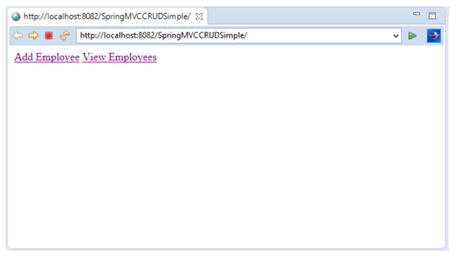
با کلیک بر روی گزینه Add Employee فرم زیر را مشاهده خواهید کرد.

فرم را پر کنید و گزینه save را بزنید تا این ورودی به پایگاه داده اضافه شود.
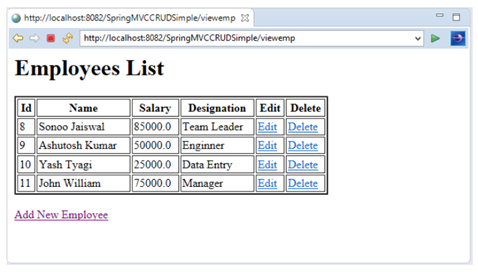
حال گزینه edit را انتخاب کنید تا در داده ارائه شده تغییراتی ایجاد کنید.
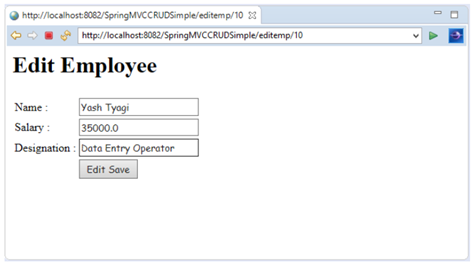
حال گزینه edit save را انتخاب کنید تا ورودی تغییر یافته را به پایگاه داده اضافه کنید.
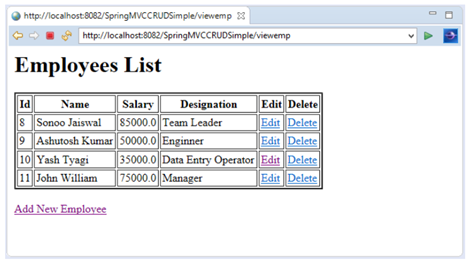
حال گزینه delete را انتخاب کنید تا ورودی را از پایگاه داده حذف کنید.
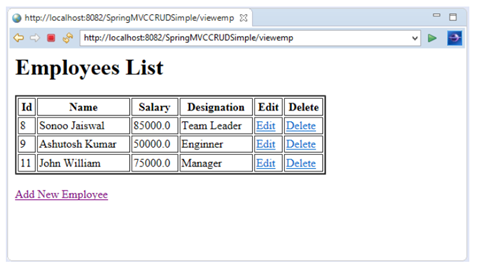
فایل SQL را دانلود کنید.
اگر از maven استفاده نمی کنید، فایل MYSQL-connector.jar را دانلود کنید.