


مثال Spring Security با پیکربندی XML
پروژه Spring Security
در این آموزش، Spring Security را با فریمورک MVC Spring پیاده سازی می کنیم. تمامی مثال ها MVC Spring هستند و با استفاده از پروژه maven ساخته شده اند. ازSpring Security نسخه 5.0.0 استفاده می کنیم. در ادامه وابستگی های maven مورد استفاده در همه مثال ها آورده شده است.
< dependency>
         < groupId>org.springframework.security< /groupId>
         < artifactId>spring-security-web< /artifactId>
         < version>5.0.0.RELEASE< /version>
< /dependency>
< dependency>
         < groupId>org.springframework.security< /groupId>
         < artifactId>spring-security-core< /artifactId>
         < version>5.0.0.RELEASE< /version>
< /dependency>
< dependency>
         < groupId>org.springframework.security< /groupId>
         < artifactId>spring-security-config< /artifactId>
         < version>5.0.0.RELEASE< /version>
< /dependency>
برای پیاده سازی Spring Security در برنامه کاربردی Spring ، می توان با استفاده از پیکربندی مبتنی بر xml یا جاوا ، آن را ساخت. مثالی را می بینیم که در آن از xml برای پیکربندی Spring Security استفاده می کنیم.
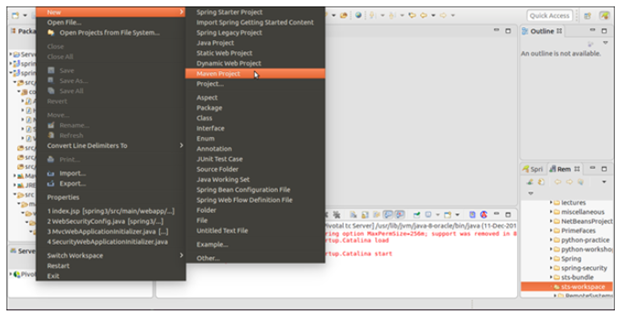
یک پروژه maven ایجاد کنید. همانند شکل زیر، روی گزینه file در مسیر new > maven project کلیک کنید.
نام و مکان قرار گیری پروژه را انتخاب کنید.
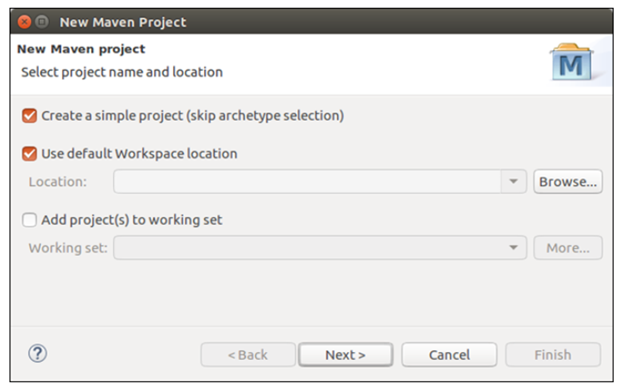
نام پروژه را ارائه کنید. نام پروژه را ارائه کنید و نوع packaging را انتخاب کنید. مانند war (Web Archive) که در زیر آمده است.

پروژه را تمام کنید. همانند شکل زیر یک ساختار دایرکتوری خالی از پروژه ساخته شده است.
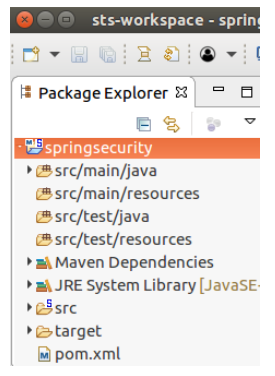
در ابتدا، آن خالی است. بنابراین یک برنامه کاربردی MVC Spring ایجاد کنید و آن را با Spring Security ادغام کنید. این طرح پروژه ما است که شامل یک کنترلر، سه فایل xml و دو فایل jsp است.

سورس کد پروژه Spring Security
نام پروژه ما springsecurity است و شامل فایل های سورس زیر است.
کنترلر :
HomeController.java
package com.javatpoint.controller;

import org.springframework.stereotype.Controller;
import org.springframework.web.bind.annotation.RequestMapping;
import org.springframework.web.bind.annotation.RequestMethod;

@Controller
public class HomeController {

    @RequestMapping(value="/", method=RequestMethod.GET)
    public String home() {
        return "home";
    }

    @RequestMapping(value="/admin", method=RequestMethod.GET)
    public String privateHome() {
        return "privatePage";
    }
}
پیکربندی Spring Security :
spring-security.xml
< beans:beans xmlns="http://www.springframework.org/schema/security"
xmlns:beans="http://www.springframework.org/schema/beans"
xmlns:xsi="http://www.w3.org/2001/XMLSchema-instance"
xsi:schemaLocation="http://www.springframework.org/schema/beans
     http://www.springframework.org/schema/beans/spring-beans.xsd
     http://www.springframework.org/schema/security
     http://www.springframework.org/schema/security/spring-security.xsd">
     < http auto-config="true">
          < intercept-url pattern="/admin" access="hasRole('ROLE_ADMIN')" />

     < /http>
     < authentication-manager>
        < authentication-provider>
           < user-service>
           < user name="admin" password="1234" authorities="hasRole(ROLE_ADMIN)" />

           < /user-service>
        < /authentication-provider>
     < /authentication-manager>
< /beans:beans>
توزیع کننده servlet :
spring-servlet.xml
< ?xml version="1.0" encoding="UTF-8" ?>

< beans xmlns="http://www.springframework.org/schema/beans"
xmlns:xsi="http://www.w3.org/2001/XMLSchema-instance"
xmlns:mvc="http://www.springframework.org/schema/mvc"
xmlns:context="http://www.springframework.org/schema/context"
xsi:schemaLocation="
http://www.springframework.org/schema/mvc
http://www.springframework.org/schema/mvc/spring-mvc.xsd
http://www.springframework.org/schema/beans
http://www.springframework.org/schema/beans/spring-beans.xsd
http://www.springframework.org/schema/context
http://www.springframework.org/schema/context/spring-context.xsd">
< mvc:annotation-driven />

   < context:component-scan base-package="com.javatpoint.controller">
   < /context:component-scan>
   < context:annotation-config>< /context:annotation-config>
   < bean class="org.springframework.web.servlet.view.InternalResourceViewResolver">
      < property name="prefix" value="/WEB-INF/views/">< /property>
      < property name="suffix" value=".jsp">< /property>
   < /bean>
< /beans>
توصیف گر وب :
web.xml
< ?xml version="1.0" encoding="UTF-8" ?>

< !DOCTYPE xml>

    < web-app xmlns="http://xmlns.jcp.org/xml/ns/javaee"
xmlns:xsi="http://www.w3.org/2001/XMLSchema-instance"
xsi:schemaLocation="http://xmlns.jcp.org/xml/ns/javaee
         http://xmlns.jcp.org/xml/ns/javaee/web-app_3_1.xsd"
version="3.1">

        < !-- Spring Configuration -->
        < servlet>
             < servlet-name>spring< /servlet-name>
             < servlet-class>org.springframework.web.servlet.DispatcherServlet< /servlet-class>
             < load-on-startup>1< /load-on-startup>
        < /servlet>
        < servlet-mapping>
             < servlet-name>spring< /servlet-name>
             < url-pattern>/< /url-pattern>
        < /servlet-mapping>

        < listener>
        < listener-class>org.springframework.web.context.ContextLoaderListener< /listener-class>
    < /listener>

    < filter>
         < filter-name>springSecurityFilterChain< /filter-name>
         < filter-class>org.springframework.web.filter.DelegatingFilterProxy< /filter-class>
    < /filter>
    < filter-mapping>
         < filter-name>springSecurityFilterChain< /filter-name>
         < url-pattern>/*< /url-pattern>
    < /filter-mapping>

        < context-param>
             < param-name>contextConfigLocation< /param-name>
             < param-value>
                  /WEB-INF/spring-servlet.xml
                  /WEB-INF/spring-security.xml
             < /param-value>
        < /context-param>
< /web-app>
وابستگی های پروژه :
pom.xml
< project xmlns="http://maven.apache.org/POM/4.0.0"
xmlns:xsi="http://www.w3.org/2001/XMLSchema-instance"
xsi:schemaLocation="http://maven.apache.org/POM/4.0.0
http://maven.apache.org/xsd/maven-4.0.0.xsd">
  < modelVersion>4.0.0< /modelVersion>
  < groupId>com.javatpoint< /groupId>
  < artifactId>springsecurity< /artifactId>
  < version>0.0.1-SNAPSHOT< /version>
  < packaging>war< /packaging>
< properties>
     < maven.compiler.target>1.8< /maven.compiler.target>
     < maven.compiler.source>1.8< /maven.compiler.source>
< /properties>
< dependencies>
  < dependency>
            < groupId>org.springframework< /groupId>
            < artifactId>spring-webmvc< /artifactId>
            < version>5.0.2.RELEASE< /version>
        < /dependency>
        < dependency>
        < groupId>org.springframework.security< /groupId>
        < artifactId>spring-security-web< /artifactId>
        < version>5.0.0.RELEASE< /version>
    < /dependency>
    < dependency>
         < groupId>org.springframework.security< /groupId>
         < artifactId>spring-security-core< /artifactId>
         < version>5.0.0.RELEASE< /version>
    < /dependency>
    < dependency>
         < groupId>org.springframework.security< /groupId>
         < artifactId>spring-security-config< /artifactId>
         < version>5.0.0.RELEASE< /version>
    < /dependency>

< dependency>
     < groupId>javax.servlet< /groupId>
     < artifactId>javax.servlet-api< /artifactId>
     < version>3.1.0< /version>
     < scope>provided< /scope>
< /dependency>
< /dependencies>
< build>
     < plugins>
          < plugin>
               < groupId>org.apache.maven.plugins< /groupId>
               < artifactId>maven-war-plugin< /artifactId>
               < version>2.6< /version>
               < configuration>
                    < failOnMissingWebXml>false< /failOnMissingWebXml>
               < /configuration>
          < /plugin>
     < /plugins>
< /build>
< /project>
صفحات منظر(view pages) :
home.jsp
< html>
< head>
< meta content="text/html; charset=UTF-8">

< title>Home< /title>
< /head>
< body>
< h2>Welcome to javatpoint spring tutorial!< /h2>
< /body>
< /html>
privatePage.jsp :
home.jsp
< html>
< head>
< meta http-equiv="Content-Type" content="text/html; charset=UTF-8">

< title>Admin< /title>
< /head>
< body>
Hello Admin
< /body>
< /html>
خروجی :
این مثال با استفاده از Apache Tomcat v9.0 اجرا شده است. پس از اجرا خروجی زیر در مرورگر ایجاد می شود. در ابتدا صفحه home.jsp که خروجی زیر را نمایش می دهد، رندر(render) میکند.
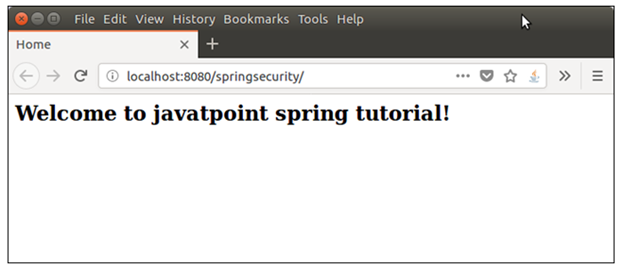
Spring Security را به صفحه ادمین (admin) اضافه کرده ایم. اگر /admin را در مرورگر وارد کنیم، برنامه خروجی زیر را تولید می کند.
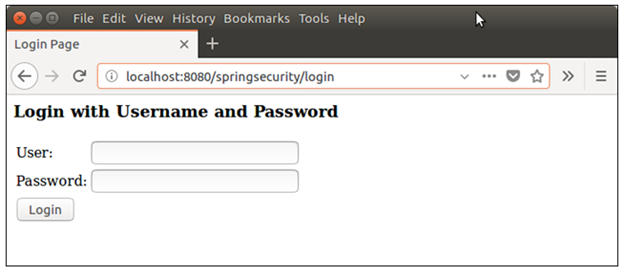
حال، این جادوی واقعیSpring Security است که برای حفاظت منابع در مقابل کاربران غیر معتبر ارائه می کند. این ماژول ارائه شده Spring Security است، ما آن را ایجاد نکرده ایم. همچنین ورودی کاربر را اعتبار سنجی می کند.
ارائه مدارک اشتباه :
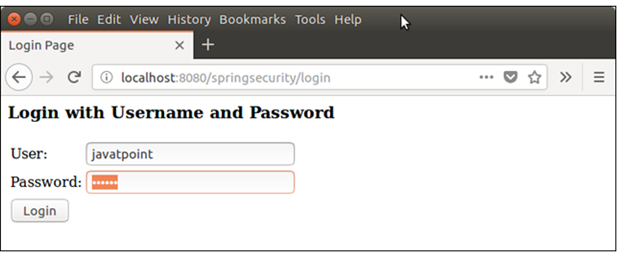
اگر مدارک ورود اشتباه ارائه دهیم، آن را با نام کاربری و کلمه عبور ذکر شده در فایل spring-security.xml اعتبار سنجی میکند. پس از اعتبار سنجی، اگر مدارک ورود اشتباه باشد، یک پیام خطا می دهد.
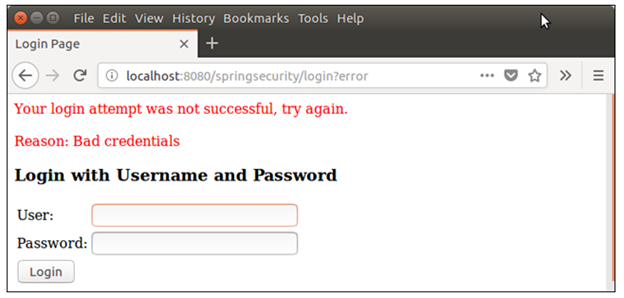
خب در این مثال، ماژول ورودSpring Security را دیدیم که چگونه مطابقت نام کاربری و کلمه عبور داده شده را اعتبار سنجی می کند.
در بخش بعدی منطق های بعدی مانند رندر کاربر پس از ورود موفقیت آمیز، را پیاده سازی می کنیم.