مشخصات مقاله
-
575
-
0.0
-
2484
-
0
-
0
آموزش احراز هویت مبتنی بر فرم در Java Spring
احراز هویت (Authentication) مبتنی بر فرم
احراز هویت (Authentication) مبتنی بر فرم امنیت Spring
احراز هویت (Authentication) مبتنی بر فرم روشی است که در آن هویت کاربر توسط فرم ورود به سیستم احراز می شود. این فرم داخلی است و توسط فریمورک امنیت Spring ارائه می شود. کلاس HttpSecurity متد formLogin() را ارائه می کند که وظیفه آن رندر کردن فرم ورود و اعتبار سنجی اطلاعات کاربر است. در این آموزش، مثالی ایجاد می کنیم که احراز هویت (Authentication)مبتنی بر فرم را پیاده سازی می کند. مثال را شروع می کنیم.
یک پروژه maven ایجاد کنید. یک پروژه maven با جزییات پروژه ایجاد کنید.

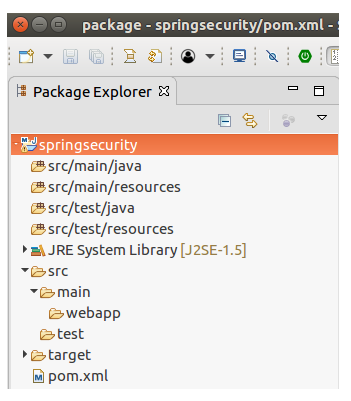
پروژه در ابتدا به این شکل است.
پیکربندی امنیت Spring
امنیت Spring را با استفاده از فایل های جاوای زیر در برنامه پیکربندی کنید. پکیج com.javatpoint را ایجاد کنید و همه فایل ها را در آن قرار دهید.
// AppConfig.java
package com.javatpoint;
import org.springframework.context.annotation.Bean;
import org.springframework.context.annotation.ComponentScan;
import org.springframework.context.annotation.Configuration;
import org.springframework.web.servlet.config.annotation.EnableWebMvc;
import org.springframework.web.servlet.view.InternalResourceViewResolver;
import org.springframework.web.servlet.view.JstlView;
@EnableWebMvc
@Configuration
@ComponentScan({ "com.javatpoint.controller.*" })
public class AppConfig {
    @Bean
    public InternalResourceViewResolver viewResolver() {
        InternalResourceViewResolver viewResolver
                          = new InternalResourceViewResolver();
        //viewResolver.setViewClass(JstlView.class);
        viewResolver.setPrefix("/WEB-INF/views/");
        viewResolver.setSuffix(".jsp");
        return viewResolver;
    }
}
// MvcWebApplicationInitializer.java
package com.javatpoint;
import org.springframework.web.servlet.support.AbstractAnnotationConfigDispatcherServletInitializer;
public class MvcWebApplicationInitializer extends
        AbstractAnnotationConfigDispatcherServletInitializer {
    @Override
    protected Class[] getRootConfigClasses() {
        return new Class[] { WebSecurityConfig.class };
    }
    @Override
    protected Class[] getServletConfigClasses() {
        // TODO Auto-generated method stub
        return null;
    }
    @Override
    protected String[] getServletMappings() {
        return new String[] { "/" };
    }
}
// SecurityWebApplicationInitializer.java
package com.javatpoint;
import org.springframework.security.web.context.*;
public class SecurityWebApplicationInitializer extends AbstractSecurityWebApplicationInitializer {
    }
// WebSecuiryConfig.java
package com.javatpoint;
import org.springframework.context.annotation.*;
import org.springframework.security.config.annotation.web.builders.HttpSecurity;
import org.springframework.security.config.annotation.web.configuration.*;
import org.springframework.security.core.userdetails.*;
import org.springframework.security.provisioning.InMemoryUserDetailsManager;
import org.springframework.security.web.util.matcher.AntPathRequestMatcher;
@EnableWebSecurity
@ComponentScan("com.javatpoint")
public class WebSecurityConfig extends WebSecurityConfigurerAdapter {
  @Bean
  public UserDetailsService userDetailsService() {
      InMemoryUserDetailsManager manager = new InMemoryUserDetailsManager();
      manager.createUser(User.withDefaultPasswordEncoder()
      .username("admin").password("admin123").roles("ADMIN").build());
      return manager;
  }
  @Override
  protected void configure(HttpSecurity http) throws Exception {
      http.authorizeRequests().
      antMatchers("/index", "/user","/").permitAll()
      .antMatchers("/admin").authenticated()
      .and()
      .formLogin() // It renders a login form
      .and()
      .logout()
      .logoutRequestMatcher(new AntPathRequestMatcher("/logout"));
  }
}
کنترلر
یک کنترلر HomeController درون پکیج com.javatpoint.controller ایجاد کنید که شامل کد زیر است.
// HomeController.java
package com.javatpoint.controller;
    import org.springframework.stereotype.Controller;
    import org.springframework.web.bind.annotation.RequestMapping;
    import org.springframework.web.bind.annotation.RequestMethod;

    @ Controller
    public class HomeController {

        @ RequestMapping(value="/", method=RequestMethod.GET)
        public String index() {

            return "index";
        }
        @RequestMapping(value="/admin", method=RequestMethod.GET)
        public String admin() {

            return "admin";
        }
    }
منظر ها (views)
پروژه شامل دو منظر (صفحات JSP) زیر است. هر دو را درون پوشه WEB-INF/views قرار دهید.
// index.jsp
< html>
< head>
< title>Index Page< /title>
< /head>
< body>
Welcome to Javatpoint! < br> < br>

< a href="admin">Admin login< /a>
< /body>
< /html>
// admin.jsp
< html>
< head>
< meta http-equiv="Content-Type" content="text/html; charset=UTF-8">

< title>Home Page< /title>
< /head>
< body>
< span style="color: green;">login successful!< /span>
< a href="logout">Logout< /a>
< hr>

     < h3>Welcome Admin< /h3>
< /body>
< /html>
وابستگی های پروژه
// pom.xml
 < project xmlns="http://maven.apache.org/POM/4.0.0" xmlns:xsi="http://www.w3.org/2001/XMLSchema-instance" xsi:schemaLocation="http://maven.apache.org/POM/4.0.0 http://maven.apache.org/xsd/maven-4.0.0.xsd">
   < modelVersion>4.0.0< /modelVersion>
   < groupId>com.javatpoint< /groupId>
   < artifactId>springsecurity< /artifactId>
   < version>0.0.1-SNAPSHOT< /version>
   < packaging>war< /packaging>
   < properties>
     < maven.compiler.target>1.8< /maven.compiler.target>
     < maven.compiler.source>1.8< /maven.compiler.source>
 < /properties>
 < dependencies>
   < dependency>
             < groupId>org.springframework< /groupId>
             < artifactId>spring-webmvc< /artifactId>
             < version>5.0.2.RELEASE< /version>
         < /dependency>
         < dependency>
         < groupId>org.springframework.security< /groupId>
         < artifactId>spring-security-web< /artifactId>
         < version>5.0.0.RELEASE< /version>
     < /dependency>
 < dependency>
      < groupId>org.springframework.security< /groupId>
      < artifactId>spring-security-core< /artifactId>
      < version>5.0.4.RELEASE< /version>
 < /dependency>
      < !-- https://mvnrepository.com/artifact/org.springframework.security/spring-security-config -->
 < dependency>
      < groupId>org.springframework.security< /groupId>
      < artifactId>spring-security-config< /artifactId>
      < version>5.0.4.RELEASE< /version>
 < /dependency>


         < !-- https://mvnrepository.com/artifact/javax.servlet/javax.servlet-api -->
 < dependency>
      < groupId>javax.servlet< /groupId>
      < artifactId>javax.servlet-api< /artifactId>
      < version>3.1.0< /version>
      < scope>provided< /scope>
 < /dependency>
 < dependency>
     < groupId>javax.servlet< /groupId>
     < artifactId>jstl< /artifactId>
     < version>1.2< /version>
 < /dependency>
 < /dependencies>
   < build>
     < plugins>
         < plugin>
             < groupId>org.apache.maven.plugins< /groupId>
             < artifactId>maven-war-plugin< /artifactId>
             < version>2.6< /version>
             < configuration>
                 < failOnMissingWebXml>false< /failOnMissingWebXml>
             < /configuration>
         < /plugin>
     < /plugins>
 < /build>
 < /project>
ساختار پروژه
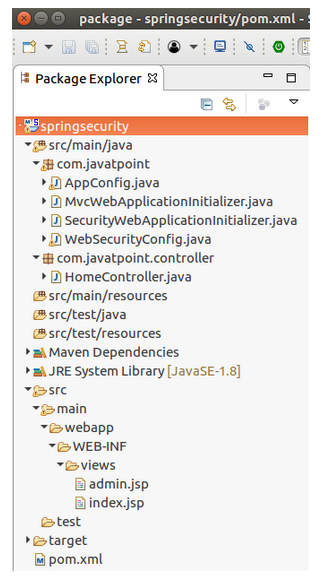
پس از اضافه کردن همه این فایل ها، ساختار پروژه به این شکل می شود.
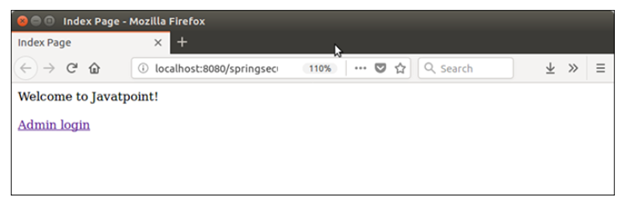
سرور را اجرا کنید. برنامه را روی سرور اجرا کنید و ببینید که این خروجی را روی مرورگر تولید می کند.
خروجی :
روی لینک کلیک کنید. یک فرم ورود که از احراز هویت مبتنی بر فرم استفاده می کند، رندر می شود.

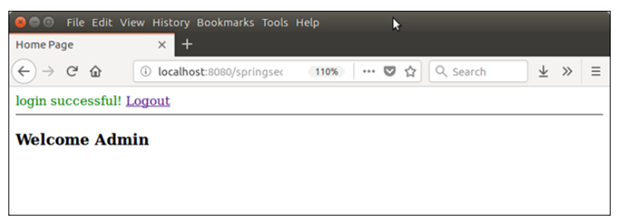
پس از تایید اعتبار اطلاعات، کاربر را تایید می کند و به صفحه ادمین می رود.