


مشخصات مقاله
-
510
-
0.0
-
2644
-
0
-
0
سیستم Login در قالب امنیت در Java Spring
ورود – خروج در قالب امنیت در Spring
مثال ماژول ورود- خروج در قالب امنیت در Spring
امنیتSpring ویژگی های ورود و خروجی ارائه می دهد که می توان از آن در برنامه استفاده کرد. ایجاد برنامهSpring امن مفید است.
در اینجا یک برنامه Spring MVC را توسط امنیت Spring و پیاده سازی ویژگی های ورود و خروج، ایجاد می کنیم. در ابتدا یک پروژه maven ایجاد می کنیم و وابستگی های پروژه را در فایل pom.xml ارائه می کنیم.
وابستگی های پروژه
< project xmlns="http://maven.apache.org/POM/4.0.0" xmlns:xsi="http://www.w3.org/2001/XMLSchema-instance" xsi:schemaLocation="http://maven.apache.org/POM/4.0.0 http://maven.apache.org/xsd/maven-4.0.0.xsd">
   < modelVersion>4.0.0< /modelVersion>
   < groupId>com.javatpoint< /groupId>
   < artifactId>springSecurityLoginOut< /artifactId>
   < version>0.0.1-SNAPSHOT< /version>
   < packaging>war< /packaging>
   < properties>
     < maven.compiler.target>1.8< /maven.compiler.target>
     < maven.compiler.source>1.8< /maven.compiler.source>
< /properties>
< dependencies>
  < dependency>
            < groupId>org.springframework< /groupId>
            < artifactId>spring-webmvc< /artifactId>
            < version>5.0.2.RELEASE< /version>
        < /dependency>
        < dependency>
        < groupId>org.springframework.security< /groupId>
        < artifactId>spring-security-web< /artifactId>
        < version>5.0.0.RELEASE< /version>
    < /dependency>
    < dependency>
         < groupId>org.springframework.security< /groupId>
         < artifactId>spring-security-core< /artifactId>
         < version>5.0.0.RELEASE< /version>
    < /dependency>
    < dependency>
         < groupId>org.springframework.security< /groupId>
         < artifactId>spring-security-config< /artifactId>
         < version>5.0.0.RELEASE< /version>
    < /dependency>

        < !-- https://mvnrepository.com/artifact/javax.servlet/javax.servlet-api -->
< dependency>
     < groupId>javax.servlet< /groupId>
     < artifactId>javax.servlet-api< /artifactId>
     < version>3.1.0< /version>
     < scope>provided< /scope>
< /dependency>
< dependency>
     < groupId>javax.servlet< /groupId>
     < artifactId>jstl< /artifactId>
     < version>1.2< /version>
< /dependency>
< /dependencies>
   < build>
     < plugins>
         < plugin>
             < groupId>org.apache.maven.plugins< /groupId>
             < artifactId>maven-war-plugin< /artifactId>
             < version>2.6< /version>
             < configuration>
                 < failOnMissingWebXml>false< /failOnMissingWebXml>
             < /configuration>
         < /plugin>
     < /plugins>
< /build>
< /project>
پیکربندی امنیت Spring
پس از آن، فایل های پیکربندی را به منظور فعالسازی ویژگی ورود و ارائه دسترسی مجاز تنها به کاربر مجاز، ایجاد کردیم.
این پروژه شامل چهار فایل جاوا زیر است :
AppConfig.java
package com.javatpoint;
import org.springframework.context.annotation.Bean;
import org.springframework.context.annotation.ComponentScan;
import org.springframework.context.annotation.Configuration;
import org.springframework.web.servlet.config.annotation.EnableWebMvc;
import org.springframework.web.servlet.view.InternalResourceViewResolver;
import org.springframework.web.servlet.view.JstlView;

@EnableWebMvc
@Configuration
@ComponentScan({ "com.javatpoint.controller.*" })
public class AppConfig {
    @Bean
    public InternalResourceViewResolver viewResolver() {
        InternalResourceViewResolver viewResolver
                          = new InternalResourceViewResolver();
        viewResolver.setViewClass(JstlView.class);
        viewResolver.setPrefix("/WEB-INF/views/");
        viewResolver.setSuffix(".jsp");
        return viewResolver;
    }
}
MvcWebApplicationInitializer.java
package com.javatpoint;
import org.springframework.web.servlet.support.AbstractAnnotationConfigDispatcherServletInitializer;
public class MvcWebApplicationInitializer extends
        AbstractAnnotationConfigDispatcherServletInitializer {
    @Override
    protected Class[] getRootConfigClasses() {
        return new Class[] { WebSecurityConfig.class };
    }
    @Override
    protected Class[] getServletConfigClasses() {
        // TODO Auto-generated method stub
        return null;
    }
    @Override
    protected String[] getServletMappings() {
        return new String[] { "/" };
    }
}
SecurityWebApplicationInitializer.java
package com.javatpoint;
import org.springframework.security.web.context.*;
public class SecurityWebApplicationInitializer
    extends AbstractSecurityWebApplicationInitializer {
}
WebSecurityConfig.java
package com.javatpoint;
import org.springframework.context.annotation.*;
//import org.springframework.security.config.annotation.authentication.builders.*;
import org.springframework.security.config.annotation.web.builders.HttpSecurity;
import org.springframework.security.config.annotation.web.configuration.*;
import org.springframework.security.core.userdetails.User;
import org.springframework.security.core.userdetails.UserDetailsService;
import org.springframework.security.provisioning.InMemoryUserDetailsManager;
import org.springframework.web.servlet.config.annotation.WebMvcConfigurer;
@EnableWebSecurity
@ComponentScan("com.javatpoint")
public class WebSecurityConfig extends WebSecurityConfigurerAdapter {

    @Bean
    public UserDetailsService userDetailsService() {
        InMemoryUserDetailsManager manager = new InMemoryUserDetailsManager();
        manager.createUser(User.withDefaultPasswordEncoder()
        .username("irfan").password("khan").roles("ADMIN").build());
        return manager;
    }

    @Override
    protected void configure(HttpSecurity http) throws Exception {

        http
        .authorizeRequests()
            .anyRequest().hasRole("ADMIN")
            .and().formLogin().and()
        .httpBasic()
        .and()
        .logout()
        .logoutUrl("/j_spring_security_logout")
        .logoutSuccessUrl("/")
        ;
    }
}
HomeController
کنترلر برای مدیریت درخواست های کاربر.
package com.javatpoint.controller;
import javax.servlet.http.HttpServletRequest;
import javax.servlet.http.HttpServletResponse;
import org.springframework.security.core.Authentication;
import org.springframework.security.core.context.SecurityContextHolder;
import org.springframework.security.web.authentication.logout.SecurityContextLogoutHandler;
import org.springframework.stereotype.Controller;
import org.springframework.web.bind.annotation.RequestMapping;
import org.springframework.web.bind.annotation.RequestMethod;
@Controller
public class HomeController {
    @RequestMapping(value = "/", method = RequestMethod.GET)
    public String index() {
        return "index";
    }

    @RequestMapping(value="/logout", method=RequestMethod.GET)
    public String logoutPage(HttpServletRequest request, HttpServletResponse response) {
        Authentication auth = SecurityContextHolder.getContext().getAuthentication();
        if (auth != null){
           new SecurityContextLogoutHandler().logout(request, response, auth);
        }
         return "redirect:/";
     }
}
Views (منظرها)
یک فایل JSP با نام index.jsp داریم که شامل کد زیر است.
<%@ page language="java" contentType="text/html; charset=UTF-8"
    pageEncoding="UTF-8"%>
    <%@ taglib prefix="c" uri="http://java.sun.com/jsp/jstl/core"%>
< !DOCTYPE html PUBLIC "-//W3C//DTD HTML 4.01 Transitional//EN"
"http://www.w3.org/TR/html4/loose.dtd">

< html>
< head>
< meta http-equiv="Content-Type" content="text/html; charset=UTF-8">

< title>Home< /title>
< /head>
< body>
< h3> Hello $ {pageContext.request.userPrincipal.name}, < /h3>
< h4>Welcome to Javatpoint! < /h4>
< a href="< c:url value='/logout' />">Click here to logout< /a>
< /body>
< /html>
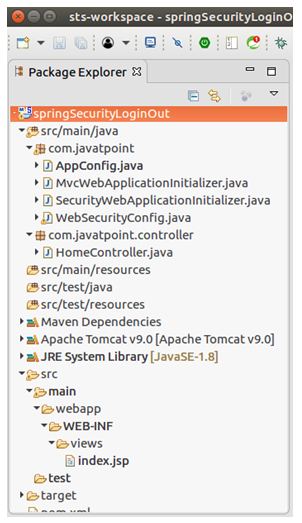
ساختار پروژه
پس از ایجاد فایل های بالا، ساختار پروژه به این شکل خواهد بود.
خروجی :
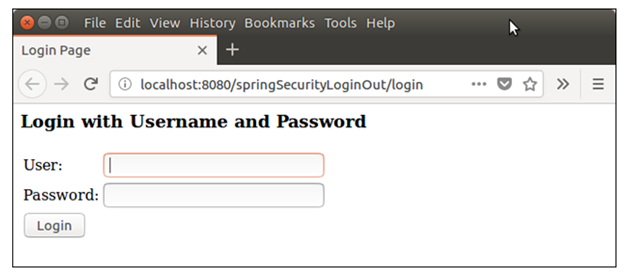
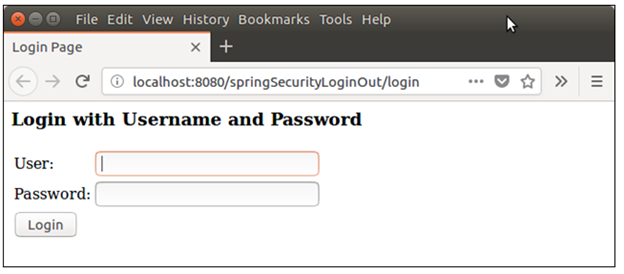
در زمان اجرا از apache tomcat استفاده کنید. خروجی مشابه شکل زیر در مرورگر ایجاد می کند.
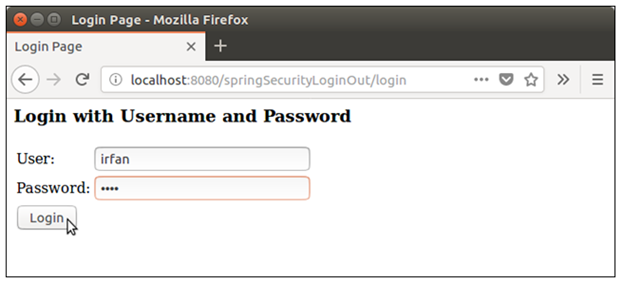
حال اطلاعات کاربر را برای ورود ارائه کنید.
پس از ورود موفقیت آمیز صفحه خانه را مانند شکل زیر نشان می دهد.
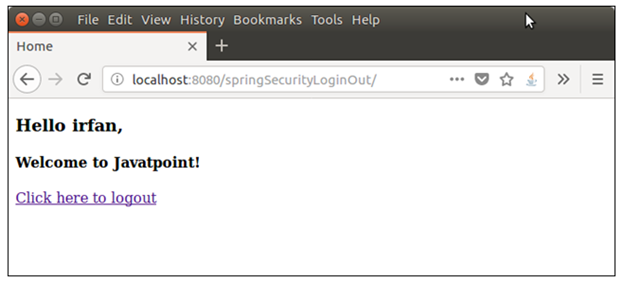
در اینجا یک لینک خروج قابل استفاده برای خارج شدن ایجاد می کنیم. حال از برنامه خارج شوید.
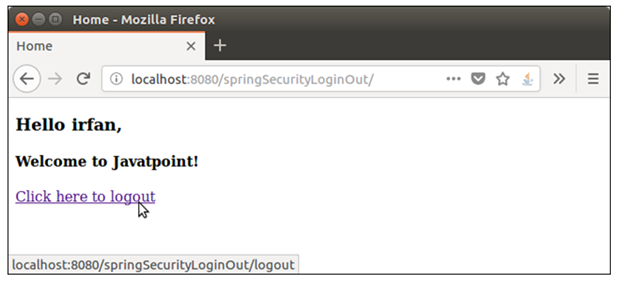
و به صفحه اولیه ورود هدایت می شوید.
خب، یک برنامه Spring MVC را با موفقیت ایجاد کرده ایم که برای پیاده سازی ویژگی های ورود و خروج از امنیت Spring استفاده می کند.