آموزش ایجاد دکمه آیکون Icon Buttons در وب
در این مقاله می آموزیم که چطور با استفاده از کد CSS , Html آیکون Icon Buttons ایجاد کنیم.
قدم اول : کد HTML را اضافه کنید.
مثال :
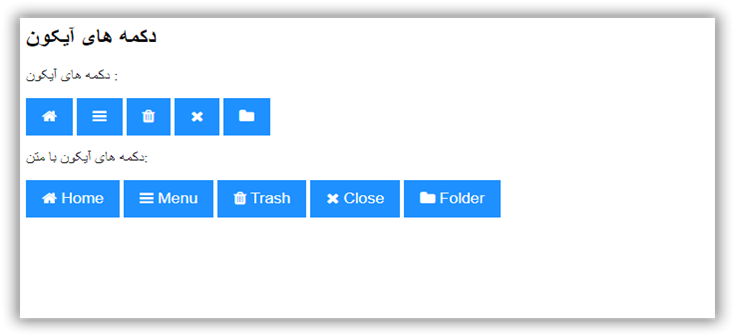
Icon buttons:
Icon buttons with text:
قدم دوم : کد CSS را اضافه کنید.
مثال :
                                /* Style buttons */
                .btn {
                  background-color: DodgerBlue; /* Blue background */
                  border: none; /* Remove borders */
                  color: white; /* White text */
                  padding: 12px 16px; /* Some padding */
                  font-size: 16px; /* Set a font size */
                  cursor: pointer; /* Mouse pointer on hover */
                }

                /* Darker background on mouse-over */
                .btn:hover {
                  background-color: RoyalBlue;
                }
نمونه یک
<h2>دکمه های آیکون </h2>
<p>دکمه های آیکون :</p>
<button class="btn"><i class="fa fa-home"></i></button>
<button class="btn"><i class="fa fa-bars"></i></button>
<button class="btn"><i class="fa fa-trash"></i></button>
<button class="btn"><i class="fa fa-close"></i></button>
<button class="btn"><i class="fa fa-folder"></i></button><p>دکمه های آیکون با متن:</p>
<button class="btn"><i class="fa fa-home"></i> Home</button>
<button class="btn"><i class="fa fa-bars"></i> Menu</button>
<button class="btn"><i class="fa fa-trash"></i> Trash</button>
<button class="btn"><i class="fa fa-close"></i> Close</button>
<button class="btn"><i class="fa fa-folder"></i> Folder</button>
نمونه دکمه آیکون Icon Buttons