


مشخصات مقاله
-
4477
-
0.0
-
12384
-
0
-
1
آموزش ساخت فاکتور با Stimulsoft Report در محیط ASP.NET MVC
در این مقاله میخواهیم با استفاده از Stimulsoft Report و از طریق ارسال پارامتر با EntityFramework در محیط Asp.Net Mvc اقدام به چاپ فاکتور نماییم
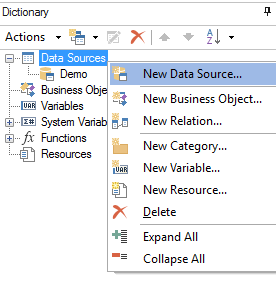
وارد محیط Designer برنامه میشویم و در تب Dictionary بر روی قسمت Data Sources کلیک راست نموده و گزینه New Data Source… را انتخاب مینماییم.
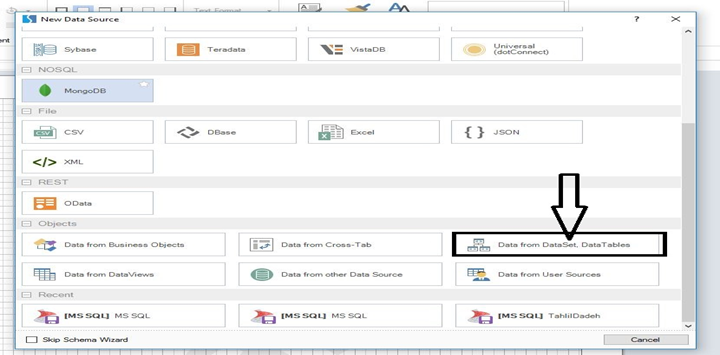
در پنجره با شده گزینه Data From DataSet,Data Table را انتخاب میکنیم.
در قسمت بعدی یک نام ذلخواه در قسمت Name وارد کرده و در قسمت َNew Column اقدام به اضافه کردن ستون میکنیم
نام ستون باید دقیقا مشابه نام ستون در دیتابیس ، ویو و یا پروسیجر باشد.

در قسمت بعدی کل ستون ها را به محیط Designer ، Drag میکنیم و گزارش را در آدرسی دلخواه ذخیره میکنیم

بعد از ذخیره فاکتور در مسیر دلخواه ، وارد نرم افزار Visual Studio شده و یک پروژه جدید از نوع Windows Asp.net Mvc ایجاد مینماییم و در قسمت Refrences ، DLL های مربوط به Stimulsoft Report را به برنامه اضافه میکنیم.(DLL ها در قالب فایل پیوست موجود میباشد)
سپس یک Action در HomeController ایجاد کرده و نام آن را GetID تعریف میکنیم و در View مربوطه کد های زیر را تایپ میکنیم
                            @{
    Layout = null;
}
< !DOCTYPE html >
< html >
< head >
    < meta name="viewport" content="width=device-width" / >
    < link href="~/Content/bootstrap.css" rel="stylesheet" / >
    < link href="~/Content/Site.css" rel="stylesheet" / >
    < title >GetID< /title >
< /head >
< body >
    @using (Html.BeginForm("showReport", "Home"))
    {
        < div class="w700" >
            < table >
                < tr >
                    < td >OrderID:< /td >
                    < td >
                        < input type="text" name="ID" class="form-control" / >
                    < /td >
                < /tr >

                < tr >
                    < td colspan="2" >
                        < input type="submit" value="ShowFactor" class="btn btn-success btn-block" / >
                    < /td >
                < /tr >
            < /table >
        < /div >
    }
< /body >
< /html >
همانطور که در کد ها میبینید فرم مربوطه به اکشن showReport میرود.
در اکشن ShowReport کد های زیر را تایپ میکنیم
public ActionResult showReport(int ID)
        {
            NorthwindEntities db = new NorthwindEntities();
           TempData["tmp"]= db.V_Factor.Where(x = > x.OrderID == ID);
            return View(TempData);
        }
سپس به ویو: ShowReport رفته و کد های زیر را تایپ میکنیم
@using System.Web.UI.WebControls
@using Stimulsoft.Report.Mvc
@{
    Layout = null;
}
< script src="~/Scripts/jquery-1.10.2.min.js" >< /script >
< !DOCTYPE html >

< html >
< head >
    < meta name="viewport" content="width=device-width" / >
    < title >showReport< /title >
< /head >
< body >
< div >
    @Html.Stimulsoft().RenderMvcViewerScripts()
    @Html.Stimulsoft().RenderMvcDesignerScripts()
    @Html.Stimulsoft().StiMvcViewer(new StiMvcViewerOptions()
    {
        ActionGetReportSnapshot = "Report",
        ActionViewerEvent = "ViewerEvent",
        Theme = StiTheme.Office2013,
        ActionPrintReport = "Print",
        ActionExportReport = "Export",
        ToolbarBackgroundColor = System.Drawing.Color.Chocolate
    })

< /div >
< /body >
< /html >
همانطور که در کد فوق ملاحظه میفرمایید ActionGetReportSnapshot اشاره میکند به اکشن Report ، سپس به اکشن مذکور رفته و کد های زیر را تایپ میکنیم
public ActionResult Report()
{
StiReport report = new StiReport();
report.RegData("Tahlildadeh",TempData["tmp"]);
string path = Server.MapPath("~/Content/Report.mrt");
report.Load(path);

return StiMvcViewer.GetReportSnapshotResult(HttpContext, report);

}
در قسمت "~/Content/Report.mrt" آدرس Report مورد نظر است که شما میتوانید آدرس دلخواه خودتان را درج نمایید
و در آخر به اکشن GetID رفته و برنامه را اجرا کنید و از گزارش خود لذت ببرید
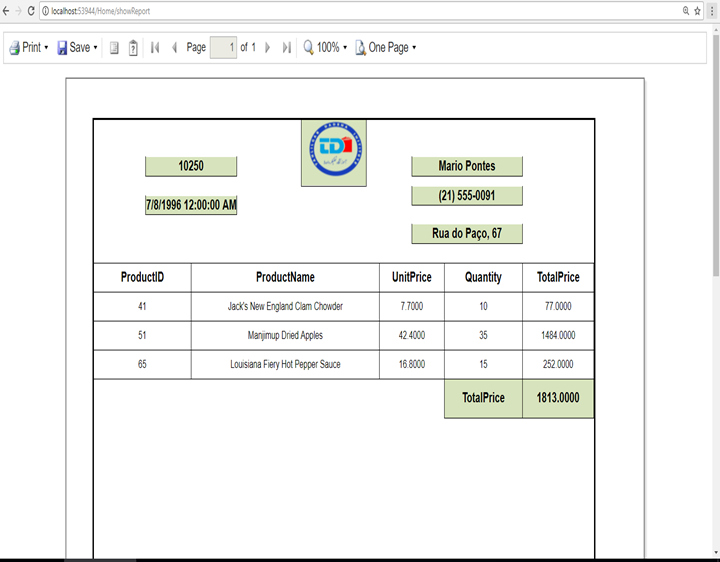
ملاحضات:
ویدئو آموزش این مقاله، در انتهای مقاله بصورت کامل و فارسی در اختیار شما کاربران محترم قرار داده شده است.