


مشخصات مقاله
-
0
-
0.0
-
1856
-
0
-
0
آموزش خروجی گرفتن از گزارشات (Exporting) در Flash Viewer Stimulsoft
آموزش خروجی گرفتن از گزارشات (Exporting) در Flash Viewer Stimulsoft
با استفاده از Flash Viewer می توانید از گزارش خود در فرمت های مختلفی چون PDF, HTML, Word, Excel, XPS, RTF، تصویر، متن و ... خروجی بگیرید.
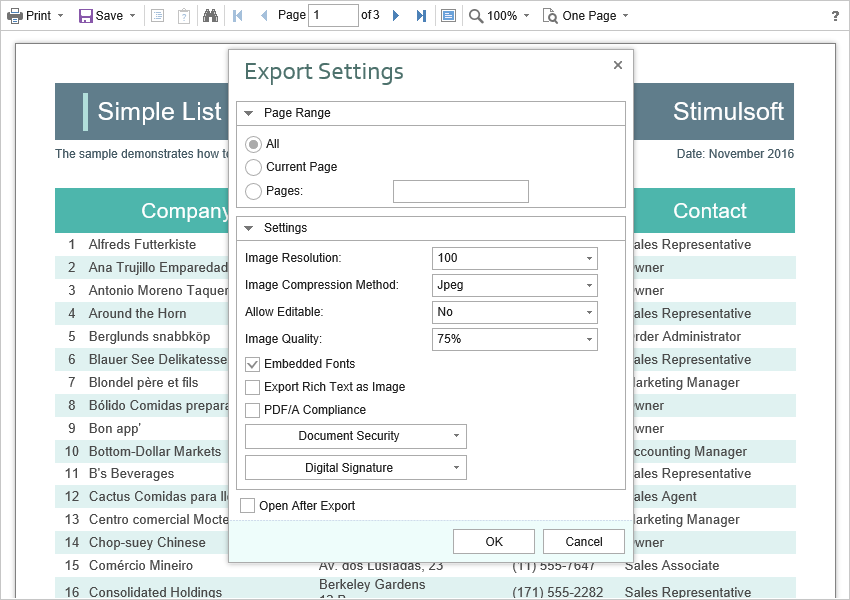
متد export تنطیمات اضافه ای برای viewer لازم ندارد. اگر می خواهید عملیات خاصی قبل از Export کردن انجام دهید باید یک ExportReport action تعریف کنید.
Index.cshtml
...
@Html.StiNetCoreViewerFx(new StiNetCoreViewerFxOptions() {
Actions =
{
ExportReport = "ExportReport"
}
})
...
HomeController.cs
...
public IActionResult ExportReport()
{
// Some code before export
// ...

return StiNetCoreViewerFx.ExportReportResult(this);
}
...
تنظیمات Export
Flash Viewer بیش از 30 فرمت خروجی گرفتن در اختیار می گذارد. گاهی لازم است فرمت هایی را حذف کنیم. این کار برای ساده کردن UI و کار با viewer لازم است. برای غیرفعال کردن format های موردنظر، کافی است مقادیر property هایی از viewer که در زیر لیست شده اند را false مقداردهی کنید.
Index.cshtml
...
@Html.StiNetCoreViewerFx(new StiNetCoreViewerFxOptions() {
Exports =
{
ShowExportToDocument = true,
ShowExportToPdf = true,
ShowExportToXps = true,
ShowExportToPowerPoint = true,
ShowExportToHtml = true,
ShowExportToHtml5 = true,
ShowExportToMht = true,
ShowExportToText = true,
ShowExportToRtf = true,
ShowExportToWord2007 = true,
ShowExportToOpenDocumentWriter = true,
ShowExportToExcel = true,
ShowExportToExcelXml = true,
ShowExportToExcel2007 = true,
ShowExportToOpenDocumentCalc = true,
ShowExportToCsv = true,
ShowExportToDbf = true,
ShowExportToXml = true,
ShowExportToDif = true,
ShowExportToSylk = true,
ShowExportToImageBmp = true,
ShowExportToImageGif = true,
ShowExportToImageJpeg = true,
ShowExportToImagePcx = true,
ShowExportToImagePng = true,
ShowExportToImageTiff = true,
ShowExportToImageMetafile = true,
ShowExportToImageSvg = true,
ShowExportToImageSvgz = true
}
})
...
هر فرمت خروجی گرفتن از گزارش تنظیمات متفاوتی دارد، و هر یک از این تنظیمات مقدار پیش فرض خود را دارد. برای تغییر این مقادیر پیش فرض، به DefaultSettings property از viewer نیاز داریم.
Index.cshtml
...
@Html.StiNetCoreViewer(new StiNetCoreViewerOptions() {
Exports =
{
DefaultSettings =
{
ExportToPdf =
{
ImageQuality = 0.75f,
ImageFormat = Stimulsoft.Report.Export.StiImageFormat.Color
},
ExportToHtml =
{
ExportMode = Stimulsoft.Report.Export.StiHtmlExportMode.Div,
UseEmbeddedImages = true
}
}
}
})
...
می توانید کل پنجره های مربوط به Export را مخفی کنید و خروجی گرفتن با تنظیمات پیش فرض انجام می شود. به این منظور کافی است مقدار ShowExportDialog property را به false مقداردهی کنید.
Index.cshtml
...
@Html.StiNetCoreViewerFx(new StiNetCoreViewerFxOptions() {
Exports =
{
ShowExportDialog = false
}
})
...
با Flash Viewer component می توانید کل منوی export را غیرفعال کنید. برای این کار، مقدار ShowSaveButton property را به false مقداردهی کنید.
Index.cshtml
...
@Html.StiNetCoreViewerFx(new StiNetCoreViewerFxOptions() {
Toolbar =
{
ShowSaveButton = false
}
})
...